Vocals to MIDI: use a clean melody and check the result
A vocals-to-MIDI conversion is easiest to judge when the recording contains one clear melody. Record a short phrase, convert it locally, download the MIDI, and compare the listed notes with what you actually sang.
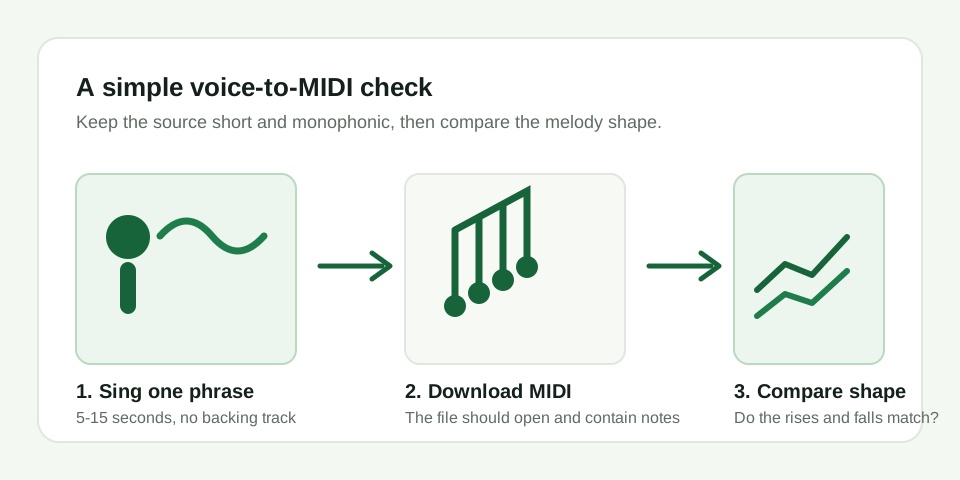
.mid file that opens, and its note names move in the same up-and-down pattern as your recording.
Controlled voice-fixture protocol
Before publishing any voice-fixture result, MIDI Convert uses the same machine-checkable rules for every source shape. These fixtures are voice-like synthetic signals, not recordings of a person. They exist to make the detector's behavior reproducible; they are not a general human-voice accuracy claim.
| Rule | Machine-checkable definition |
|---|---|
| Valid input note | One declared target pitch region of at least 50 ms, with a known center pitch and start/end timestamps in the generated WAV manifest |
| Retained note | Exactly one output MIDI event overlaps at least 50% of that target region and its MIDI pitch is within 50 cents of the target center pitch |
| Moving-pitch match | For drift or vibrato fixtures, use the declared pitch trajectory at the output event's midpoint instead of a fixed center pitch; the same 50% overlap and 50-cent tolerance apply |
| Missed note | No output event meets the retained-note rule for a declared valid input note |
| Extra event | An output event that cannot be matched to any declared input note, or a second output event matched to the same input note |
| Report statistic | For each parameter point, report the median output-event count across 10 generated WAVs and the retained / missed / extra-event counts; never report one file as the result |
Locked sample plan: each parameter point has 10 mono WAV fixtures, generated with the same declared pitch, duration, amplitude envelope, sample rate, and detector settings. The ten fixtures use documented initial-phase presets so frame alignment is exercised without changing the tested parameter. The four groups run in this order: isolated notes and alternating note changes as the baseline; slow pitch drift; 5-7 Hz vibrato; then soft and breathy note onsets.
Locked software version: MIDI Convert browser detector, script.js SHA-256 DDA185AC8FB6A179A4FCFA73FD4197ACC95B8B6F59B233F5D3E330F596309F9F; test runner Node.js v24.19.0. A future detector-file hash is a different version and cannot reuse these figures.
Shared conditions for every result table: mono 44.1 kHz 16-bit PCM WAV; voice-like harmonic synthetic source with fundamental, second, third, and fourth harmonics weighted 1 / 0.42 / 0.20 / 0.08 at 0.70 amplitude; 8 ms offset fade; Melody / solo instrument mode; Balanced sensitivity; 2,048-sample analysis window; 1,024-sample hop. Each point uses ten initial phases, from 0 to 324 degrees in 36-degree steps. No listener rating or subjective listening judgment is used as a pass criterion.
Controlled voice-fixture results
Every value below is the median across ten generated files. All ten repetitions returned the same result vector at each tested point. These are reproducible implementation checks for the locked conditions above, not a general human-voice accuracy claim.
| Baseline source | Median result across 10 files | First tested boundary |
|---|---|---|
| One isolated C4 voice-like note | 50-55 ms: 0 retained, 1 missed; 60 ms: 1 retained, 0 missed, 0 extra | 60 ms was the first tested retained duration |
| Eight alternating C4/E4 notes with no silence | 60 ms/note: 5 retained, 3 missed; 75 ms/note: 7 retained, 1 missed, 1 extra; 80 ms/note: 8 retained, 0 missed, 0 extra | 80 ms per note was the first fully retained eight-note sequence |
| Moving-pitch source | Median result across 10 files | What the fixture shows |
|---|---|---|
| Slow pitch drift: C4 plus or minus 1.5 semitones for 2 seconds | 0.10 Hz: 1 event, 1 retained; 0.125 Hz: 2 events, 1 retained, 1 extra | Slow pitch drift is a separate axis: 0.125 Hz was the first tested rate that added an extra event |
| Vibrato: C4 for 2 seconds at 5 / 6 / 7 Hz, plus or minus 0.5 semitones | 1 event, 1 retained, 0 extra at each rate | At these rates, this shallower depth did not fragment the one-line result |
| Vibrato: C4 for 2 seconds at 5 / 6 / 7 Hz, plus or minus 1.0 semitone | 20 / 24 / 28 events and 20 / 24 / 28 extra events at 5 / 6 / 7 Hz | Depth decided whether it split; at the same depth, rate decided how many events appeared |
| 300 ms C4 onset source | Median result across 10 files | Limit of this test |
|---|---|---|
| Clean voice-like signal with 8-240 ms attack | 1 retained, 0 missed, 0 extra at every tested attack length | Within this synthetic 300 ms sample, a slower clean attack alone did not cause a miss |
| 40 ms attack with deterministic noise mix | 0.30 mix: 1 retained; 0.40 mix: 0 retained, 1 missed | The mix value is a synthetic fixture parameter, not a percentage for a human breathy voice |
Do not detach the conditions from the figures: waveform, pitch, source duration, harmonic balance, noise mix, sensitivity, detector version, and sample rate can change the result. The source files are fixtures for this detector build, not evidence that a real singer, instrument, or complete song will meet the same boundary.
1. Record the right input
Use a phone or computer microphone and record one voice at a comfortable volume. Leave out drums, chords, a backing track, room music, and heavy reverb. A simple phrase with separated notes is easier to inspect than a full song.
You do not need a polished vocal take. A quiet hum, whistle, or sung scale is useful because you already know which notes you intended. Keep the recording short so the result is easy to compare.
2. Convert it in the browser
- Open the MP3 to MIDI tool.
- Choose the recorded MP3, WAV, M4A, or another supported audio file.
- Leave Detection mode on Melody / solo instrument.
- Click Convert to MIDI and wait for the note list.
- Download the generated
.midfile.
This page processes the selected file in your browser. It is designed for a single dominant pitch, not for separating a complete mix into multiple instruments.
3. Check whether the conversion passed
Use these three checks instead of judging the file by its name:
- The file is real: the download is not 0 bytes and your MIDI app can open it.
- The shape matches: if your melody rises, falls, and repeats, the listed note names should follow roughly the same pattern.
- The mistakes are explainable: one or two wrong notes can happen at a breath or slide; a page full of unrelated notes usually means the input included noise or accompaniment.
How do I know whether voice to MIDI worked?
It worked when the MIDI file opens and the note contour follows the phrase you sang. Do not expect every pitch to be exact at a breath, slide, or noisy syllable. Treat a result as failed when it is empty, cannot open, or fills the editor with notes that do not resemble the melody at all.
When the result is noisy
First make the recording simpler. Remove the backing track, move closer to the microphone, sing one note at a time, and try again. You can also try the tool's Detailed sensitivity setting, but sensitivity cannot separate a voice from a loud instrumental part.
If the same clean phrase repeatedly produces unrelated notes, that is a useful failure result: the recording or browser decoder needs another test. It is not evidence that a full mixed song will transcribe accurately.
What voice to MIDI can and cannot mean
Here, "voice to MIDI" means estimating a monophonic pitch line and writing it as MIDI note events. MIDI stores note, timing, and velocity information; it does not contain the original vocal sound. Open the download in a DAW, notation app, or MIDI editor to inspect or edit it.