Clean up MIDI after audio conversion: fix the sketch, not the whole song
Keep an audio-to-MIDI download only when its broad melody shape already matches the source. Then repair the few audible errors in a MIDI editor. If it follows the wrong musical part, start again with a clearer phrase instead of trying to edit a failed transcription into place.
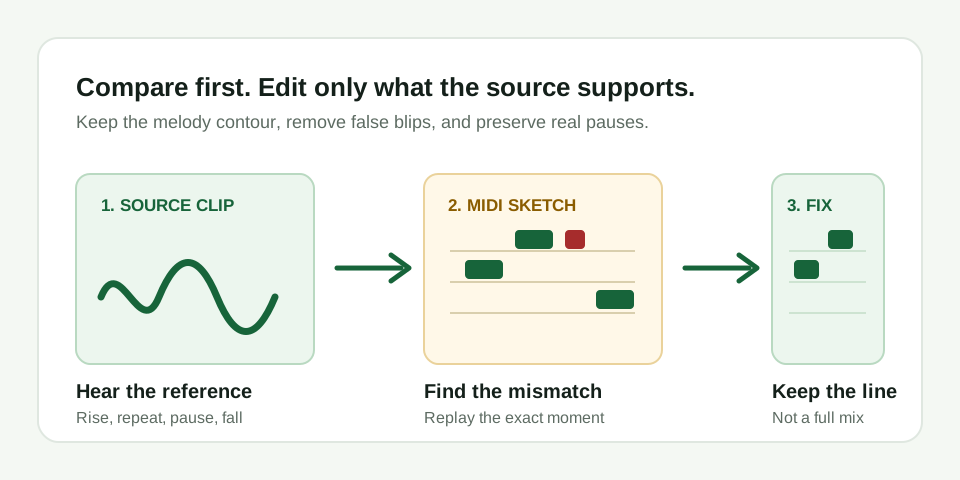
Make a keep-or-retry decision before editing
A MIDI file is a note-event sketch, not a recording of the original sound. After an audio conversion, the useful question is not whether every note is perfect. It is whether the file has captured the one melody line you intended to edit.
Listen to the source once and describe its motion in plain words. For example: "up, up, repeat, pause, down." Open the MIDI in a piano roll and make the same description. If both descriptions agree, small corrections are worthwhile. If the MIDI moves in a different direction at the main change, or tracks the bass while you intended the vocal, return to the source rather than beginning a long repair.
Use four passes to clean a usable MIDI sketch
- Mark the reference points. Put the source audio and the MIDI on adjacent tracks or switch between them. Mark the first note, the strongest rise or fall, a repeat, and the final note. These four points are enough to expose most wrong-contour results.
- Remove notes that have no audible source. A short MIDI blip near a sustained note may come from breath noise, reverb, a hard consonant, or a rough onset. Replay that small source section. Delete the event only when you cannot hear a separate intended note there.
- Correct pitch before timing. Fix a clearly wrong octave or note, but do not force slides and vibrato into many separate notes. For a melody sketch, one stable note with a sensible length is more useful than a busy row of false detail.
- Adjust starts and endings last. Move a note start or shorten an overlap only after the pitch sequence is right. Keep real pauses visible. Quantize lightly, if at all, because a rigid grid can remove the phrasing you were trying to preserve.
Replay the exact moment before every change
This is the repeatable part of the workflow. Do not decide from the MIDI picture alone. Each time an event looks suspicious, replay a half-second around it in the original audio. You are looking for a specific cause: a clear note onset, a sustained pitch, a slide, a breath, a drum hit, or an accompaniment entrance.
That comparison prevents two common mistakes. First, deleting a real quiet note because it looks small. Second, keeping a detector artifact because it happens to land near the beat. A conversion does not need to be visually tidy before you inspect it; it needs to stay accountable to something audible in the source.
| What you see | Check in the source | Cleanup move |
|---|---|---|
| One note is an octave too high or low | Replay the note onset and its neighbor | Move that note by an octave; keep its timing if the contour is otherwise right |
| Many tiny events around a held note | Listen for a separate re-attack versus breath, reverb, or vibrato | Delete artifacts and leave one stable note, or preserve a real re-attack |
| Two intended notes merge together | Check for a clear second onset or syllable | Split the event at the audible change, then set both pitches |
| Notes overlap across a pause | Listen for silence between phrases | Shorten the first note so the pause remains visible |
| The whole line follows bass or accompaniment | Compare the largest motion, not individual errors | Retry with an exposed melody; do not hand-edit a different part into the target line |
What not to fix in this tool's result
MIDI Convert estimates one dominant pitch. It does not identify every chord tone, separate stems, recognize a full arrangement, or produce finished drum and bass tracks from a mix. Do not interpret extra notes as hidden chord detection, and do not use cleanup to promise a full-song transcription.
Likewise, MIDI does not preserve the audio's singer, guitar tone, mix, or mastering. Once the note line is useful, choose an instrument in your DAW or notation software. The cleanup task is to make the performance events editable, not to recreate the original recording.
Know when the sketch is ready
A cleaned MIDI sketch is ready to use when it opens in your editor, follows the source at the marked reference points, contains no obvious events without an audible cause, and keeps the intended pauses. It may still be a draft. That is fine: the purpose is to give you a fast, editable starting point for a DAW or notation workflow.
For source selection and initial diagnosis, use the audio-to-MIDI check. For a completed melody conversion from an MP3, return to the MP3-to-MIDI converter. When you need an audio delivery from your revised notes, use the MIDI-to-WAV export workflow.