Convert MP3 into MIDI: make the final edit check
After you convert an MP3 into MIDI, keep the sketch only when its broad note shape still follows the source. Use four audible reference points to decide whether one event needs editing or the whole conversion needs a clearer phrase.
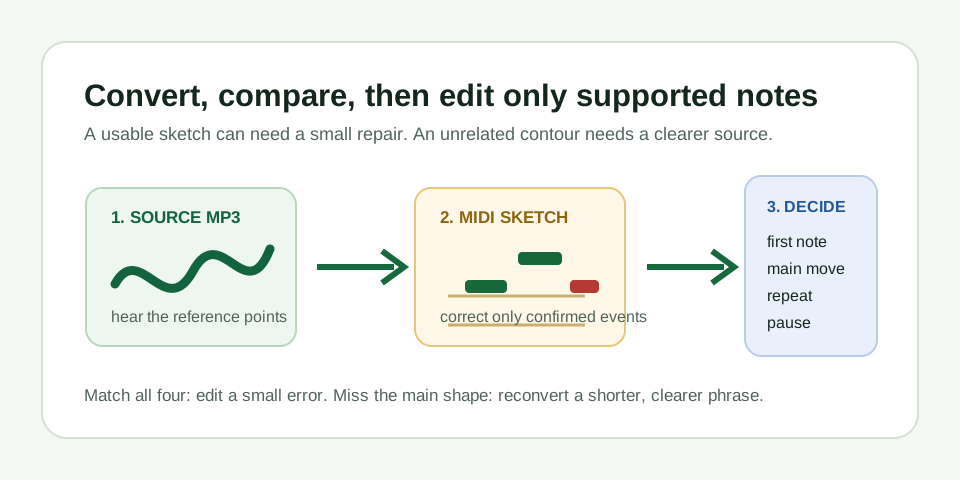
Make one decision before you start editing
A downloaded MIDI can be technically valid and still be the wrong musical line. The final edit pass answers a narrower question: is this already the melody you intended, with only small errors left? If yes, editing is faster and more honest than repeating the conversion. If no, moving every note by hand hides a bad source choice and turns a quick sketch into guesswork.
Keep the MP3 and MIDI visible together. The MP3 is the evidence. The MIDI is a set of editable note events. It may use a piano sound, a synth, or no sound until you assign an instrument; do not judge its success by whether it resembles the original recording's timbre.
Run the four-point final check
- First note. Replay the beginning of the source and find the first note block in the MIDI. A local octave or onset error is repairable when the rest of the line still agrees.
- Main movement. Identify the largest climb or drop you can hear in the MP3. The piano roll should move in the same direction at the corresponding moment. This is the most important acceptance point.
- Repeated note. If the phrase repeats a pitch, check for two separate events rather than one held block or an unrelated extra note.
- Pause. Find one audible gap. A matching MIDI gap confirms the result preserved phrasing instead of filling silence with a sustained event.
Use the result to choose the next move
| Four-point result | What it supports | Next move |
|---|---|---|
| All four agree; one note is slightly off | The melody sketch is usable | Correct that event and replay against the source |
| All four agree; a note starts or ends too late | Timing detail needs cleanup | Move or resize only the confirmed event |
| Main movement follows bass or accompaniment | The dominant pitch was not the target line | Use a shorter section with one exposed melody |
| Repeated note and pause are missing | The source was too crowded or unstable | Trim a cleaner phrase before converting again |
A reproducible editing record
Use the downloadable eight-tone MP3 and MIDI output from the earlier conversion fixture as a simple editor exercise. The source contains eight isolated tones in 5.85 seconds. The recorded browser output contains eight note events. That gives you eight event boundaries to inspect, but it is not an accuracy score for ordinary songs.
In an editor, mark the first event, the highest movement, a repeat, and the final pause. The recorded count is 8 detected events / 8 designed tones. The formula is event-count agreement = detected events divided by designed tone events, or 8 / 8 = 1.00 for this clean fixture. It only records this one controlled input; it does not predict how a mixed song will convert.
What a justified edit looks like
A justified edit has a replayable reason. Perhaps the source clearly begins on one pitch while the MIDI starts one semitone away. Perhaps two attacks are audible but the output made one long event. In either case, make the smallest change, replay the same source moment, and stop when the four reference points remain intact.
Do not use editing to claim polyphonic transcription. If chords, drums, bass, vocals, or effects compete in the MP3, the converter can estimate another dominant pitch. MIDI Convert estimates one dominant melody only; it does not separate stems, recognize chords, convert a full song, or export multiple MIDI tracks.
Keep an edit note with the source
For any sketch you keep, save a short record: which MP3 phrase you used, which reference point justified the edit, and whether you changed pitch, timing, length, or removed an extra note. This makes later arrangement work easier because you can tell a source-backed correction from a creative rewrite. Once the line is trustworthy, choose an instrument and render audio in your DAW when you need a finished sound.
Questions about the final edit pass
Should I edit the MIDI when only one note is wrong?
Yes, provided the first note, main movement, repeat, and pause still follow the MP3. Correct the local event and keep the source nearby while you replay it.
When should I convert the MP3 again instead?
Convert again when the MIDI's main contour belongs to bass, chords, accompaniment, or an unrelated pitch line. Use a shorter, clearer section with one exposed melody.