MIDI vs sheet music: notes to edit, notation to read
Use MIDI when you need editable note events. Use sheet music when you need a readable view of one melody. They can begin with the same detected notes, but neither one proves that the conversion followed the source correctly.
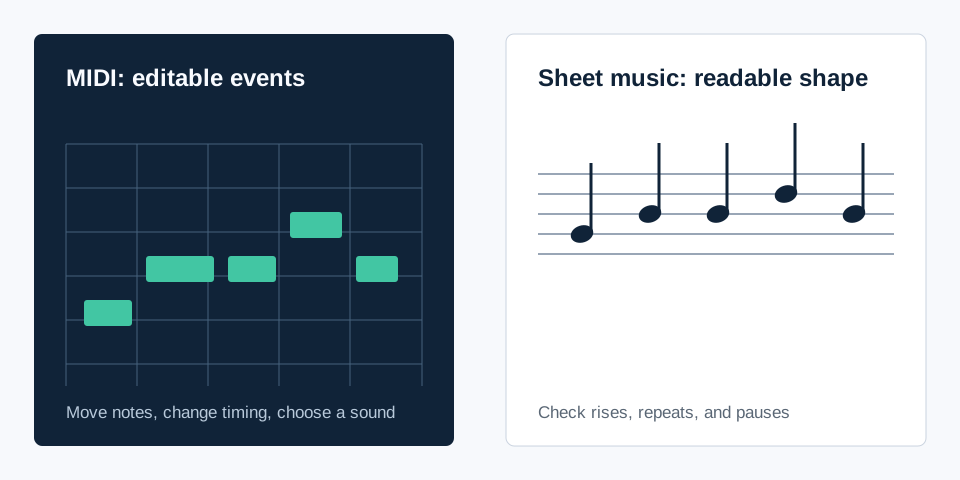
What each format is for
| Need | Use MIDI | Use the sheet preview |
|---|---|---|
| Move a note or change timing | Yes. Edit note events in a DAW or MIDI editor. | No. The preview shows the result but is not the editable source. |
| See the overall melody shape | Possible in a piano roll. | Yes. The staff makes rises, repeats, and gaps easy to compare. |
| Choose an instrument sound | Yes, after loading the file into an instrument track. | No. Notation itself does not contain recorded audio. |
| Keep a compact reading reference | Not its main job. | Yes. Download the SVG preview after checking the line. |
Start with the same evidence
For a clear, short input, MIDI Convert creates its downloadable MIDI sketch and its five-line preview from the same detected note events. That shared origin is useful, but it does not make either output automatically correct. Keep the source clip open beside the result and compare four points: the first note, the largest movement, a repeated note, and the first intentional pause.
If those four points broadly agree, the MIDI is a reasonable sketch to edit and the preview is a useful reading check. If they do not agree, changing the appearance of the score will not fix the underlying note data. Use a shorter, clearer source phrase and convert again.
Use MIDI first when the next job is editing
Open the .mid file in a DAW or MIDI editor when you need to adjust pitch, note length, timing, or playback sound. MIDI does not contain the original singer, instrument, or recording. It tells another application which notes to play, so assign a simple piano-like sound for the first check. A simple sound makes wrong starts, jumps, and pauses easier to hear.
Once the line is verified, you can choose a final instrument and render an audio preview. Keep the original audio with the MIDI file so every edit remains traceable to something you can hear.
Use the sheet preview when the next job is reading
The five-line preview is a fast visual reference for a single melody. It is helpful when you want to inspect the contour without opening a piano roll, attach a reading copy to a note-editing session, or compare a before-and-after change. It is not a promise of a complete arrangement, chord chart, or full-song score.
If a note needs correction, edit the MIDI event first. Then check the corrected result against the source again. The preview is the readable output of the same one-melody workflow, not a replacement for notation software when you need detailed engraving or manual composition.
Keep the boundary clear
This workflow estimates one dominant melody. It does not separate instruments, build a multitrack arrangement, identify every chord in a mix, or transcribe a complete song. Use a phrase where one line is exposed enough to verify. That boundary is what makes the MIDI sketch and staff preview meaningful rather than misleading.