Why vibrato creates extra MIDI notes
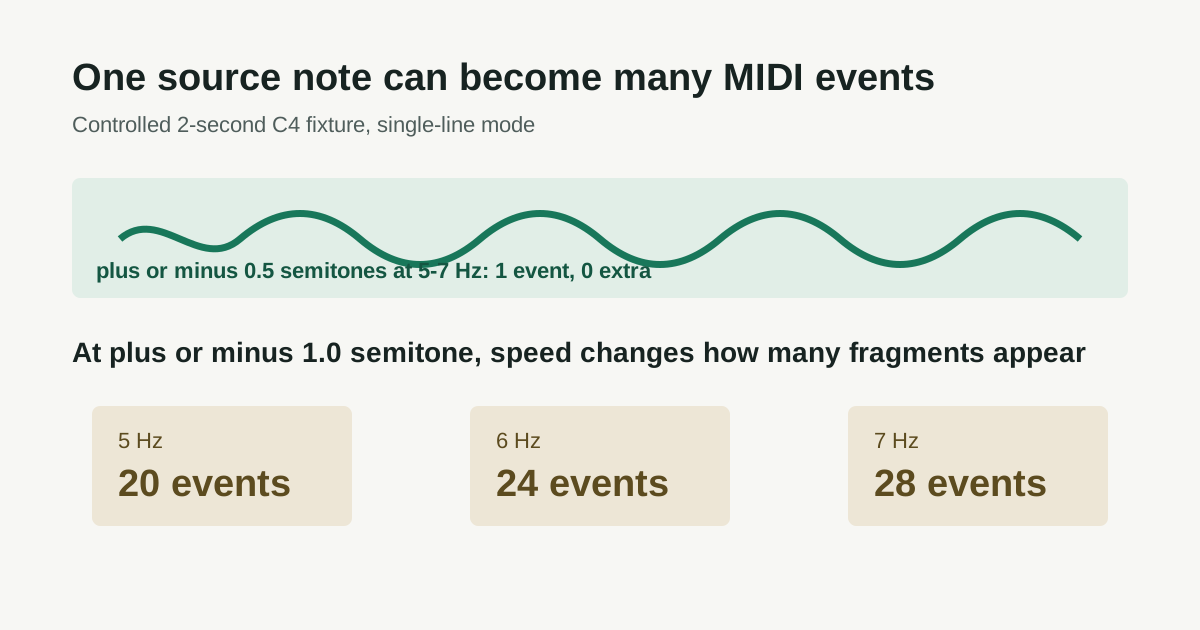
Vibrato can turn one held source note into a row of MIDI events. In this controlled single-line check, shallow vibrato stayed one event; at the deeper tested movement of plus or minus one semitone, 5, 6, and 7 Hz produced 20, 24, and 28 events.
What the controlled check measured
Each fixture was a two-second C4 source with a declared moving pitch. The purpose was not to score a singer or instrument. It was to separate two questions that are often mixed together: does vibrato start splitting a result, and once it does, does speed change how densely it fragments?
| Declared source | Median result across 10 fixtures | What the result says |
|---|---|---|
| C4, 2 seconds, 5 / 6 / 7 Hz, plus or minus 0.5 semitones | 1 retained event; 0 extra events at each rate | At this shallower tested depth, the one-line result did not fragment. |
| C4, 2 seconds, 5 Hz, plus or minus 1.0 semitone | 20 events; 20 extra events | Deeper movement crossed the splitting boundary. |
| C4, 2 seconds, 6 Hz, plus or minus 1.0 semitone | 24 events; 24 extra events | Same depth, more pitch cycles, more fragments. |
| C4, 2 seconds, 7 Hz, plus or minus 1.0 semitone | 28 events; 28 extra events | Same depth, still more fragments. |
The 5 / 6 / 7 Hz sequence contains 10 / 12 / 14 pitch cycles in two seconds. The matching 20 / 24 / 28 event counts show two detected events per cycle in this fixture. That internal pattern is why the result is more useful than an isolated anecdote.
Use the source before editing
- Locate one held note. Work on a short exposed phrase where you can hear whether there is a new attack, syllable, pluck, or bow change.
- Replay the same moment. If the source is one held note that wavers in pitch, a busy row of small MIDI blocks is not automatically a sequence of intended notes.
- Choose the smallest repair. Merge or remove fragments only when the source supports one sustained note. Preserve separate events when you hear a real re-attack.
- Retry instead of redrawing another melody. When the main contour follows accompaniment or another voice, trim an exposed phrase and convert again.
Do not confuse drift with vibrato
Slow pitch drift and vibrato are different axes. In the same controlled work, a C4 source moving plus or minus 1.5 semitones at 0.10 Hz gave one event; 0.125 Hz was the first tested drift rate to add an extra event. That is slow movement, not ordinary vocal vibrato. Keep the names with their conditions instead of borrowing one number to describe the other.
Fixture conditions and limits
Every parameter point used 10 generated mono WAV fixtures with the same declared pitch, duration, amplitude envelope, 44.1 kHz sample rate, and detector settings. The fixtures varied documented initial phase so frame alignment was exercised without changing the tested condition. Matching used the declared pitch at an output event midpoint, at least 50% time overlap, and a 50-cent tolerance. An extra event was unmatched, or a second output event matched to the same input note.
Detector settings were Balanced Melody / solo instrument mode, a 2048-sample analysis window, and a 1024-sample hop. Detector source SHA-256: DDA185AC8FB6A179A4FCFA73FD4197ACC95B8B6F59B233F5D3E330F596309F9F.
These are controlled source checks, not a general voice, instrument, complete-song, stem-separation, chord-transcription, or universal accuracy claim. Quote the conditions with the figures; without them, the figures become an unsupported promise.
Questions about vibrato and MIDI events
Why does my vocal vibrato look like many MIDI notes?
The detector follows changing pitch over time. When the movement is large enough in relation to the analysis, it can mark separate events inside one held vocal note. Check the source for a real re-attack before treating each event as intentional.
Should I quantize vibrato fragments?
Do not quantize first. Decide whether the fragments represent real separate notes or one held source note. Merge a source-backed artifact before applying timing changes.
Can this convert a full vocal performance into finished MIDI?
No. Start with one exposed melody line. This tool does not separate stems, transcribe a full arrangement, or reconstruct every vocal ornament as notation.