Song to MIDI: turn one clear hook into an editable sketch
Do not convert a whole song mix directly: this converter outputs one melody line. First prepare a monophonic vocal hook, solo, whistle, or bass phrase, then convert that exposed part into an editable MIDI sketch.
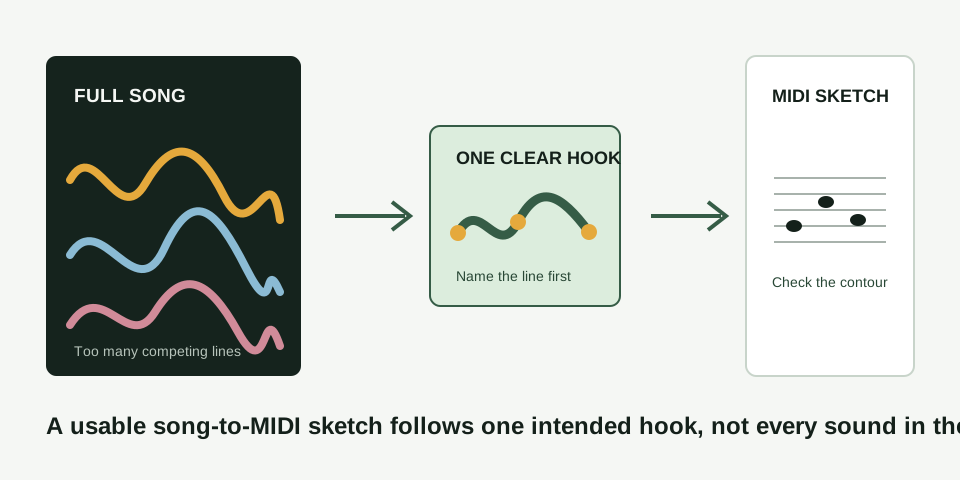
Prepare one line before conversion
A finished song can contain lead vocal, bass, chord tones, drums, effects, and backing parts at the same time. This converter makes one sequence of note events from one dominant pitch line. That is its intended use, not a defect: a clear hook can become a synth lead, guide melody, or editable bass idea.
Use another program or your own source preparation to make the intended part monophonic first. MIDI Convert does not separate stems. Once one line is exposed, label that target before you select the source clip.
Find a hook that can be checked
- Name the line. Say what you are following: lead vocal, whistle, bass phrase, or one solo.
- Trim to the exposed moment. Keep roughly five to fifteen seconds. Prefer a verse entrance, breakdown, or isolated hook over a loud chorus.
- Keep four landmarks in mind. Notice where the line starts, the largest rise or fall, one repeat, and the first clear pause.
- Convert locally. Keep the source recording available while you inspect the MIDI sketch.
Controlled mixed-source checks
The detector makes one autocorrelation pitch estimate per analysis frame and groups those estimates into one note line. Its alternate Bass line setting only changes the analyzed frequency range; it is not a polyphonic or multi-note mode.
| Fixture source | Target melody notes | Median retained | Median missed | Median extra events |
|---|---|---|---|---|
| Level 1: melody only | 8 | 7 | 1 | 0 |
| Level 2: melody + chord triads | 8 | 0 | 8 | 3 |
| Level 3: melody + chord triads + kick and high percussion | 8 | 0 | 8 | 3 |
When chord tones enter this fixture, the intended melody is no longer retained. Adding the drum layer does not change the median result: the harmonic competition is already the limiting boundary here.
Shared fixture conditions: 10 generated mono 44.1 kHz, 16-bit PCM WAV repetitions per level; Balanced Melody / solo instrument mode; 2048-sample window; 1024-sample hop; median reporting. A target note is retained only when exactly one output overlaps it by at least 50% and is within 50 cents. A missed note has no such output; an extra event is unmatched or a second output assigned to the same target. Detector version SHA-256: DDA185AC8FB6A179A4FCFA73FD4197ACC95B8B6F59B233F5D3E330F596309F9F.
These are controlled synthetic source checks, not a general song-transcription accuracy promise. They measure this single-line mode under the listed conditions only.
Use the four landmarks to accept or retry
| Source landmark | What to listen for | What the MIDI should preserve |
|---|---|---|
| Hook opening | The first intended pitch of the line | A start near that line, not a backing tone |
| Largest movement | The clearest rise or fall in the phrase | The same broad direction |
| Repeated note | One deliberate repeated attack | Separate note events rather than an unrelated run |
| First pause | The first audible gap | A comparable silence before the next event |
Keep the sketch when these landmarks agree. Repair a small event only when you can point to the exact source moment that supports the edit. Retry when the main movement or rhythm belongs to accompaniment or another voice.
What to do with a usable MIDI sketch
Open the download in a DAW or MIDI editor and choose a simple playback sound. MIDI describes notes and timing, not the singer, instrument tone, mix, or mastering of the original song. Once the contour is right, use the MIDI cleanup guide for confirmed timing or pitch edits, or use MIDI to MP3 to render a listening preview.
Questions about song to MIDI conversion
Can I convert an entire song into a full MIDI arrangement?
No. Prepare one monophonic part first. This page does not claim drum transcription, chord separation, stems, multitrack output, or a complete arrangement.
Can I use a song with vocals and instruments?
Yes, only after one intended line remains clear enough to follow. Pick an exposed vocal hook, solo, whistle, or simple bass phrase rather than a crowded section where several parts compete.
Why does the downloaded MIDI sound different from the song?
MIDI has no recorded singer or instrument sound. Load it into a DAW or MIDI editor, assign an instrument, and judge whether the note contour follows the prepared phrase.
What if the MIDI file opens but has no sound?
The note events may be present without an assigned playback instrument. Follow the silent MIDI file check before treating that as a failed conversion.